
Project Management Software for Nonprofits
The best project management software for nonprofits helps teams deliver programs, coordinate volunteers, manage approvals, and report progress without turning every board update into a second spreadsheet. Nonprofit organizations usually need more than a generic task board: they need grant deadlines, external collaborators, donor-adjacent context, budget sensitivity, and board-ready reporting in one operating rhythm. This guide explains what to score, compares the main options using official vendor pages reviewed on March 12, 2026, and shows where Scrumbuiss fits if you want delivery, CRM, forms, and time tracking connected.
Nonprofit project management software should help real time coordination across team members, volunteer work, task management, Gantt charts, and program reporting. Features including intake forms, task and project views, and team collaboration matter most when a small staff has to keep service delivery, grants, and board updates moving at the same time.
Key Takeaways
- Project management software for nonprofits should connect tasks and projects with program deadlines, volunteer work, donor-adjacent context, and leadership reporting.
- The best project management software for nonprofits depends on operating model: small teams need user friendly task management, while multi-program organizations need reporting, intake, permissions, and workload visibility.
- Free project management software for nonprofits can work for a simple volunteer group, but teams should check when a free version stops supporting forms, dashboards, guest access, Gantt charts, or donor management.
- A nonprofit organization should choose software around reporting and accountability first, then compare features like communication tools, Google Drive links, real time updates, and team collaboration.
When nonprofits outgrow spreadsheets, email, and chat
A nonprofit usually outgrows lightweight tools when work stops being "one list of tasks" and becomes "several programs with different deadlines, stakeholders, and reporting rules." The warning signs are usually operational, not technical:
- Grant deliverables, event planning, and day-to-day program work live in separate spreadsheets.
- Volunteer coordinators, program managers, and leadership are working from different status views.
- Intake forms, approvals, and follow-up tasks are handled manually through email.
- Board or donor reports are rebuilt by hand because the working system does not produce usable reporting.
- Staff cannot tell which work is funded, which is blocked, and which deadlines carry compliance risk.
That is the point where project management software becomes part of program delivery, not just a nicer to-do list. If you need the broader operating case first, start with this guide on why project management is important.
What nonprofit teams should score before they buy
Most comparison pages overweight generic features like views or AI and underweight the operational details that decide whether a nonprofit can actually run from the tool. Score each platform from 1-5 in the areas below, and reject any tool that fails the two or three categories that drive your reporting.
| Area | What good looks like | Why it matters for nonprofits | Common failure mode |
|---|---|---|---|
| Grant and program tracking | You can separate work by grant, program, or funding stream and report on deadlines, owners, and status. | Restricted funding and reporting windows create real compliance risk. | Teams manage grants in one sheet and delivery in another, so reporting always lags. |
| Volunteer coordination | External collaborators can receive assignments, updates, or forms without blowing up seat costs or permissions. | Many nonprofits rely on volunteers, contractors, or partner organizations. | The tool works for employees only, so volunteer coordination falls back to email. |
| Forms and intake | Volunteer signups, event requests, field updates, or internal approvals can feed directly into the workflow. | Manual intake creates duplicate entry and missed follow-up. | Forms live outside the system, so requests arrive without owners, deadlines, or context. |
| Approvals and governance | Leadership, finance, or program leads can review requests and status without asking the team for ad hoc updates. | Nonprofits often have tighter review paths for spending, grants, and communications. | Approval work happens in chat or inboxes and never becomes visible in the plan. |
| Donor and stakeholder context | The team can keep key contacts, partners, or donor-adjacent context close to the work. | Programs often depend on external relationships, not just internal tasks. | Tasks exist with no visible sponsor, contact history, or relationship context. |
| Budget, time, and capacity | Managers can see where hours, effort, or workload are going before a deadline slips. | Grant reporting, service delivery, and lean staffing make utilization visible very quickly. | Capacity problems surface only after missed deadlines or month-end reporting. |
| Admin overhead and pricing fit | The workspace stays understandable for a small ops team, and pricing still works when you add more contributors. | Nonprofits rarely have spare admin headcount for tool cleanup. | A flexible system turns into an unpaid internal implementation project. |
If hours and utilization are already part of the buying decision, this guide to time tracking in project management will help you define what good reporting actually needs to include.
If requests, approvals, or volunteer submissions still arrive through email and scattered forms, compare project intake software before the team adds more manual triage on top of the workflow.
Free project management software for nonprofits: what to verify
Free project management software for nonprofits can be a reasonable starting point when the team has a simple workflow and a small number of users. The question is whether the free plan can support the workflow that matters, not whether it looks generous on a pricing page.
| Free-plan question | Why it matters for nonprofits |
|---|---|
| How many team members, volunteers, guests, or external collaborators can participate? | Volunteer and partner work can create access needs that are larger than staff count. |
| Are forms, intake, and approvals included? | Many nonprofit workflows begin as requests, applications, signups, or grant-related submissions. |
| Can the team manage tasks and projects across several programs? | A single board is not enough once events, grants, service delivery, and operations run at the same time. |
| Are Gantt chart, calendar, or timeline views available? | Grant deadlines, campaigns, and events often depend on sequencing, not just task status. |
| Does reporting work without manual exports? | Board, funder, and leadership updates should come from current project data whenever possible. |
| Is donor management or stakeholder context built in or easy to connect? | Program delivery often depends on relationships, commitments, and follow-up history outside the task itself. |
If a free version answers those questions for one live program, start there. If reporting, intake, or external collaboration breaks immediately, a paid plan or more complete management solution may be cheaper than the staff time lost to manual work.
How we evaluated the best nonprofit project management tools
This guide was reviewed on July 1, 2026.
The comparison below is based on official vendor pages, not third-party listicles:
- Scrumbuiss pricing, Project Delivery, CRM, Forms, and Time Tracking
- Hive for non-profits and Hive pricing
- Asana nonprofit discount program and Asana pricing
- Planfix for nonprofits and Planfix pricing
- monday.com for nonprofits and monday.com nonprofit pricing
- ClickUp pricing
This page is organized around real nonprofit buying questions: workflow fit, reporting fit, admin overhead, and budget fit. When a vendor did not publish a precise public detail clearly, I left the exact figure out rather than guessing.
Quick comparison: project management software for nonprofits
| Tool | Best fit | Official signal | Strengths for nonprofits | Watch-outs |
|---|---|---|---|---|
| Scrumbuiss | Program teams that want delivery, intake, stakeholder context, and reporting in one system | Project delivery, CRM, forms, dashboards, and time tracking are available in the same product set | Strong when nonprofit work spans projects, requests, approvals, and reporting instead of just board-based task tracking | Smaller ecosystem than the longest-established category leaders; not the right fit if you only need a lightweight board |
| Asana | Growing staff teams with approval-heavy, cross-functional work | Eligible nonprofits can get 50% off Starter or Advanced annual plans | Clean task structure, approvals, accessible reporting, and easier adoption for mixed teams | Budget and timesheet functionality sits on paid plans or add-ons, and donor workflows may still need a second system |
| Hive | Teams that want dashboards, templates, and collaborative program tracking | Official nonprofit pages emphasize volunteers, budgets, dashboards, external users, and project tracking | Good alignment for initiative planning, status reporting, and keeping staff plus volunteers on the same page | Feature depth grows through plan choices and add-ons, so cost and simplicity should be checked carefully |
| Planfix | Donor-heavy or operations-heavy nonprofits that want CRM and project work tightly connected | Official nonprofit pages emphasize donor management, grants, volunteers, and communication workflows; pricing starts with a free plan for up to 5 users and annual paid plans from $8 per user | One of the clearest fits when supporter relationships, grants, and internal workflows need to live close together | More setup effort than a simple board tool, especially if the team does not have a clear process owner |
| monday.com | Volunteer-led orgs, fundraising teams, and event-heavy nonprofits | Official nonprofit pages highlight fundraising, grant applications, volunteer scheduling, and discount eligibility | Strong forms, dashboards, volunteer coordination, and board-style visibility that non-technical teams usually grasp quickly | Advanced reporting and governance depth are more tier-dependent, so long-term cost can rise with complexity |
| ClickUp | Cost-conscious small teams that want one flexible workspace | The public pricing page still includes a Free Forever plan | Broad feature coverage across docs, tasks, dashboards, forms, and views | Easy to over-configure; without governance, the workspace can become messy faster than staff can maintain it |
The fastest shortlist is usually two or three tools, not six. Pick one platform that looks operationally simple, one that looks operationally powerful, and run the same live workflow through both.
Best fit by nonprofit type
| Nonprofit type | Best first shortlist | Why |
|---|---|---|
| Small volunteer-led orgs | monday.com or ClickUp | Both can get a small team moving quickly, and monday.com's nonprofit pages are especially strong on volunteer recruiting, scheduling, and forms. |
| Growing program teams | Asana or Scrumbuiss | Both make ownership and reporting clearer as staff, approvals, and recurring program work grow more complex. |
| Multi-program organizations | Scrumbuiss or Hive | These are better fits when leadership needs dashboards, timelines, and a repeatable operating layer across several initiatives. |
| Donor-heavy operations | Planfix or monday.com | Both bring donor or fundraising context closer to execution than a generic task board usually does. |
If your team runs several recurring programs or events at once, pair the software choice with a clear planning model. This project timeline guide is useful for deciding how much sequencing, milestone tracking, and deadline visibility the new tool needs to support.
Where each tool tends to win
Asana
Asana is a strong nonprofit choice when the main problem is coordination across internal staff: program managers, operations, leadership, marketing, and finance. The nonprofit discount program is meaningful, and the core product is usually easier for mixed teams to adopt than engineering-oriented platforms. It is less compelling when donor management, volunteer workflows, or tightly connected intake processes are central to how the organization runs.
Hive
Hive positions its nonprofit offer around project tracking, volunteer alignment, budgets, dashboards, and external users. That makes it relevant for nonprofits that want a collaboration-first system with templates and communication built into day-to-day delivery. The main thing to verify is where the pricing lands once time, reporting, or deeper workflow needs expand beyond the first rollout.
Planfix
Planfix stands out because its nonprofit positioning is not just project boards. It explicitly leans into donor management, grants, volunteer work, and communication workflows. That makes it one of the stronger options if your nonprofit is trying to keep supporter relationships and execution closer together. The tradeoff is higher setup discipline; this is not the lightest tool in the category.
monday.com
monday.com is especially strong for nonprofits that run fundraising campaigns, volunteer coordination, and event-like operational work. The official nonprofit pages emphasize grant applications, donor profiles, dashboards, and volunteer availability, which aligns well with many smaller or mid-sized organizations. It is a good fit when ease of rollout matters more than deep process standardization.
ClickUp
ClickUp earns its place on the shortlist because budget matters. The Free Forever plan and broad flexibility make it attractive for smaller organizations that want one workspace for tasks, docs, and forms. The risk is governance: if every team configures the workspace differently, reporting becomes harder exactly when the nonprofit starts to scale.
How Scrumbuiss fits
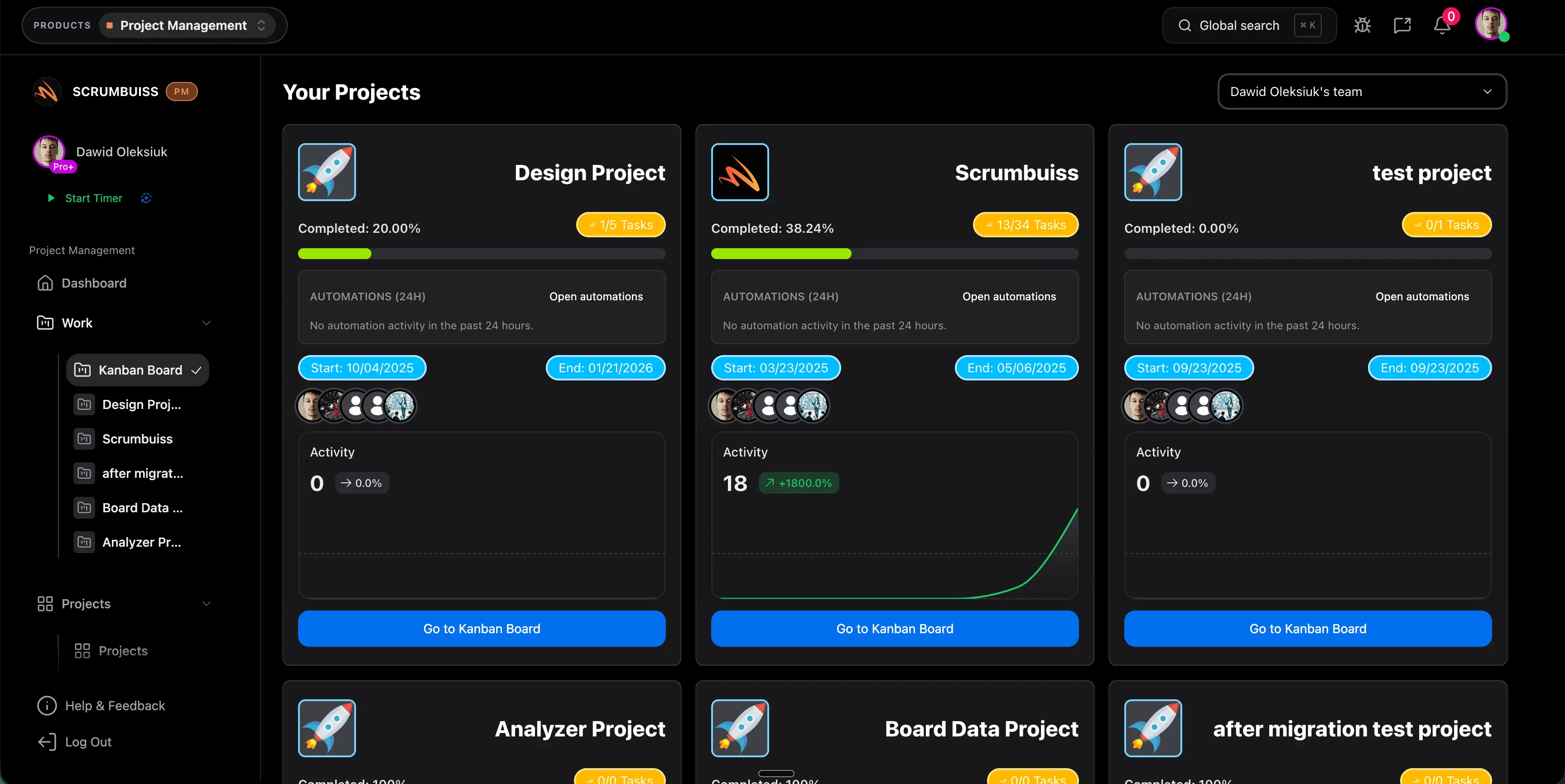
Scrumbuiss is strongest when the nonprofit does not just need a task board. It is a better fit when requests, programs, approvals, stakeholder context, and reporting all need to connect inside one operating layer. That is especially useful for organizations managing recurring programs, grant-funded work, partner coordination, or service delivery that depends on both internal staff and external contributors.
A practical nonprofit rollout usually starts with Project Delivery and then adds the adjacent pieces that remove manual work:
- CRM if contacts, partners, sponsors, or donor-adjacent relationships should stay visible next to the work.
- Project Intake if the team needs a clearer workflow for volunteer intake, grant requests, approvals, routing, and handoff into delivery.
- Forms if the main need is better project forms and structured submission capture inside that workflow.
- Time Tracking if grant reporting, service hours, or staff capacity need better visibility.
- Dashboard when leadership needs board-ready progress views instead of exported status updates.
- Workload & Capacity when a small team is carrying too many overlapping programs.
When Scrumbuiss is a fit
- You want one place for intake, delivery, reporting, and operational follow-up.
- Leadership needs status visibility without waiting for manual board or grant updates.
- Your nonprofit wants to reduce tool sprawl across project tracking, forms, CRM context, and time reporting.
- Several teams or programs need a repeatable workflow instead of each team inventing its own board.
When Scrumbuiss is not the best fit
- You only need a simple task board for a very small volunteer group.
- Your organization already runs on a donor platform or work management system that would be too expensive to replace.
- You need a highly specialized fundraising suite first, and project delivery is only a secondary problem.
A 60-90 day rollout checklist for nonprofit teams
The cleanest implementations start with one live workflow, not a full historical migration.
Days 1-14: define the reporting model
- Pick one live program, campaign, or grant-funded initiative.
- Agree on status names, owners, deadlines, and one approval path.
- Decide which fields leadership or grant managers actually need to report on.
- Import only active work, current contacts, and current requests.
- Build one dashboard or saved view that replaces a manual status document.
Days 15-45: move intake and execution into one system
- Route volunteer signups, requests, or internal approvals through forms instead of inboxes.
- Run weekly program reviews from the new tool, not from a side spreadsheet.
- Add timeline or dependency views if deadlines depend on handoffs between teams.
- Invite the minimum useful set of external collaborators or volunteers.
- Fix naming, ownership, and status rules before adding another team.
Days 46-90: add visibility and automation
- Layer in time tracking, budget fields, or workload views if reporting needs them.
- Automate reminders for approvals, overdue tasks, and reporting checkpoints.
- Create templates for recurring programs, events, and grant work.
- Retire duplicate spreadsheets once the workflow is stable.
- Review monthly which reports can now be generated directly from the system.
Common mistakes that keep nonprofit software from paying off
- Buying a generic board because it demos well, then rebuilding grant, donor, or volunteer context outside the system.
- Migrating old projects before the team can run one live program cleanly.
- Treating board reporting as a manual export problem instead of a workflow-design problem.
- Letting every department invent different statuses, owners, and field names.
- Optimizing for the cheapest starting plan without checking how reporting, forms, or extra collaborators affect the real cost.
FAQ
Frequently
asked
questions
Related features
Explore the Scrumbuiss features mentioned in this article.
- CRM
Manage contacts, companies, deals, and pipelines.
- Forms
Capture project requests with intake forms and route approved work into the right workflow.
- Time Tracking
Track time with timers, entries, and reports.
- Dashboard
Track project progress, blockers, workload, KPIs, status reporting, and analytics context in one live dashboard.
Unlock Success &
Power Up Your Projects
Next to explore
Explore more pages to understand the product suite, common workflows, and evaluation guides.